---
title: Create a Customized At-Home Exercise Program for a Patient
description: Learn how to build and personalize an at-home rehabilitation program for your patients, including custom exercises and settings.
---
[Skip to content](https://help.neckcare.com/create-a-customized-at-home-exercise-program-for-a-patient#main-content)
-1.png?height=20&name=NeckCare%20Logo_big%20(1)-1.png)
Open main navigation
Close main navigation
- [Request Support](mailto:support@neckcare.com)
[Request Support](mailto:support@neckcare.com)
We're here to help...
- There are no suggestions because the search field is empty.
1. [Help Center](https://help.neckcare.com/?hsLang=en)
2. [NeckCare Home™](https://help.neckcare.com/neckcare-home?hsLang=en)
# Create a Customized At-Home Exercise Program for a Patient
## This guide walks you through assigning a customized at-home exercise program to a patient.
💡 This step is not mandatory. You can always default to the NeckCare Home default session.
### Steps
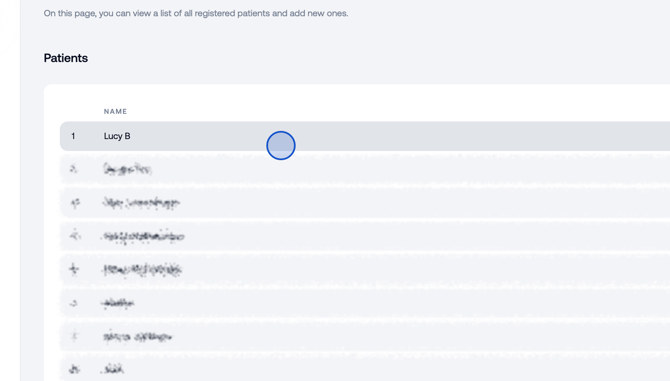
1. Select a patient to begin personalizing their at-home exercise plan.
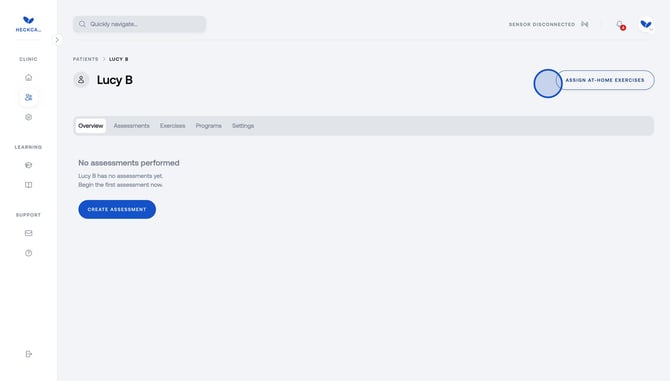
2. Click to assign at-home exercises.
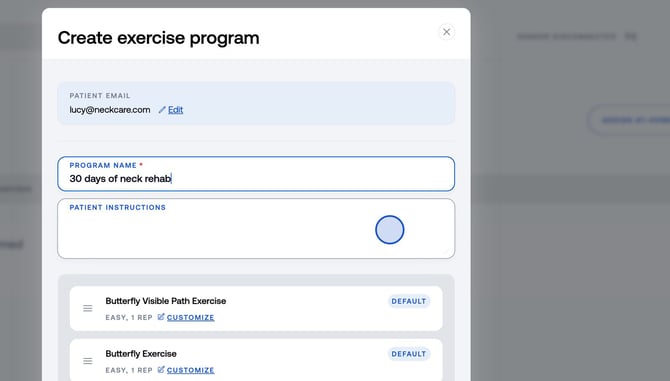
3. Name the new program and add instructions for the patient.
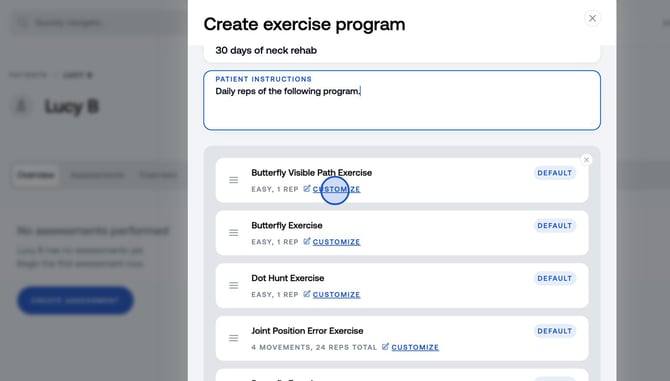
4. You can customize exercises based on the patient's rehabilitation needs and adjust the repetitions as needed. Remove any exercises by clicking (x) on the right corner, or add new exercises based on your assessment, set the number of reps and Click **Confirm**.
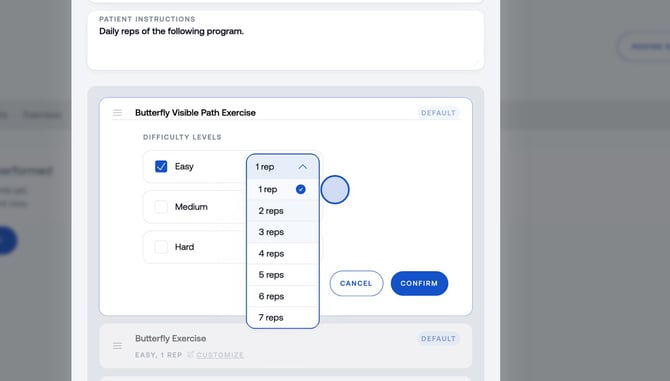
5. Confirm your exercise customizations and Click **Create Program** to give your patient access to the program.
- [Practice Marketing Materials](https://help.neckcare.com/practice-marketing-materials?hsLang=en#main-content)
- [NeckCare Home](https://help.neckcare.com/practice-marketing-materials?hsLang=en#neckcare-home)
- [For Patients](https://help.neckcare.com/for-patients?hsLang=en)
- [Getting Started](https://help.neckcare.com/getting-started?hsLang=en)
- [Setup & Requirements](https://help.neckcare.com/setup-requirements?hsLang=en)
- [Sensor Calibration](https://help.neckcare.com/sensor-calibration?hsLang=en)
- [Hardware & Device](https://help.neckcare.com/hardware-device?hsLang=en)
- [Platform Navigation](https://help.neckcare.com/platform-navigation?hsLang=en)
- [Assessments](https://help.neckcare.com/assessments?hsLang=en)
- [Exercises](https://help.neckcare.com/exercises?hsLang=en)
- [Results & Reporting](https://help.neckcare.com/results-reporting?hsLang=en)
- [Administration](https://help.neckcare.com/administration?hsLang=en)
- [NeckCare Home™](https://help.neckcare.com/neckcare-home?hsLang=en)
- [Troubleshooting](https://help.neckcare.com/troubleshooting?hsLang=en#main-content)
- [Bluetooth](https://help.neckcare.com/troubleshooting?hsLang=en#bluetooth)
- [FAQ](https://help.neckcare.com/faq?hsLang=en)
- [Maintenance](https://help.neckcare.com/maintenance?hsLang=en)
- [Safety & Compliance](https://help.neckcare.com/safety-compliance?hsLang=en)
[](http://app.neckcare.com)
support@neckcare.com
Copyright © 2025, NeckCare